Linggo, Marso 6

Javascript:Autosum Program

I never thought that javascript would actually run on blogger even if you just put it in post. I thought you need to add another pagae element which is javascript/html on your page.
But I thought wrong!!! And I'm shocked to know that it really works!!!

Here's an example of a javascript autosum that is already running! Try it!
First No.  Second No. Total


Click here for the code

I am Tired

I am tired
So don't make things harder for me...
Maybe it'll be a lot easier for you
But for me...it's quite a no no no...

I know I'm not that good
I know I'm not that smart
I know I'm not there always by yourside
But I don't know what you really want...

So to be fair and safe...
Tell me frankly
or shout at my face
The wrong deeds I've made
For the wrong words I've said...

I just ask you one thing...
Don't do this to me..
Cause it hurts to do the things
that I dont' want to do
and I haven't tried at all...

Maybe today...
Maybe tomorrow...
or maybe the following weeks...
and month or years perhaps...
:(

Javascript: Limit Checkbox

Having a hard time in error trapping your PHP program?
First, I already post javascript codes that allow the users to input number only.
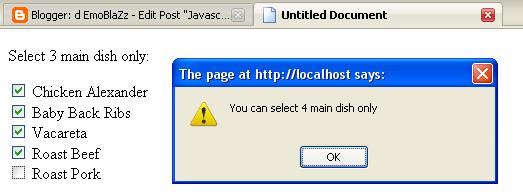
Today, I'll give you an idea on how to 'limit checkboxes in javascript'.
The following html codes will be used for input purposes. The example will limit the user to select 3 menus only.
So here's an easy step to do it:
1st Step: Insert this javascript code inside you head tag.

<script type="text/javascript">
function checkboxlimit(checkgroup, limit){
var checkgroup=checkgroup
var limit=limit
for (var i=0; i<checkgroup.length; i++){
checkgroup[i].onclick=function(){
var checkedcount=0
for (var i=0; i<checkgroup.length; i++)
checkedcount+=(checkgroup[i].checked)? 1 : 0
if (checkedcount>limit){
alert("You can select "+limit+" main dish only")
this.checked=false
}
}
}
}
</script>


2nd Step: Copy the following on notepad or macromedia dreamweaver.

<form id="maindish" name="maindish">
Select 3 main dish only:
<input type="checkbox" name="menu" /> Chicken Alexander<br />
<input type="checkbox" name="menu" /> Baby Back Ribs<br />
<input type="checkbox" name="menu" /> Vacareta<br />
<input type="checkbox" name="menu" /> Roast Beef<br />
<input type="checkbox" name="menu" /> Roast Pork<br />
</form>

Last Step: Put the following code on the last part of your page or codes.
<script type="text/javascript">
checkboxlimit(document.forms.maindish.menu, 3)
</script>
Note:maindish is the form name, menu is the checkboxes name and 3 is the limit.

Javascript Input Numbers Only

This simple javascript code allows you to trap errors on textbox.
It allows the user to input numbers only on a certain text boxes. Symbols and letters are not allowed.

Add this attribute to the textbox you want to input numbers only.
onkeypress="return isNumberKey(event)"

isNumberKey(event) is the name of your javascript function.

You can put this code either on the head section or on the last part of you codes. It will still function.

<script language="javascript" >
 function isNumberKey(evt)
 {
var charCode = (evt.which) ? evt.which : event.keyCode
if (charCode > 31 && (charCode < 48 || charCode > 57))
return false;
return true;
 }  
</script>

Huwebes, Marso 3

PHP: Simple Calculator


Here are the steps in creating a simple calculator using PHP.
You can use either Switch or If Statement.


Step 1: Copy the following HTML code into a notepad or dreamweaver.
<html>
<head><title>PHP Simple Calculator</title></head>
<body>
<form method="post">
Enter First No.
<input type="text" name="firstnum">
Select operator:
<select name="operator">
<option>+</option>
<option>-</option>
<option>*</option>
<option>/</option>
</select>
Enter Second No.
<input type="text" name="secondnum">
<input type="submit" name="calculate" value="Calculate">
</form>
</body>
</html>
Step 2: Add the following PHP script anywhere in the page where you want the result will be displayed.
<?php
$first=$_POST['firstnum'];
$second=$_POST['secondnum'];
$operator=$_POST['operator'];
if ($operator=="+")
{$total=$first + $second;}
if ($operator=="-")
{$total=$first - $second;}
if ($operator=="*")
{$total=$first * $second;}
if ($operator=="/")
{$total=$first / $second;}
echo $total;
?>

Step 3: Save you page with the .php file extension in the directory wamp/www. Be sure to have any mini-server such as Wampserver or Easy PHP installed. If you don't have any, here's a link to download it. wampserver or easyphp

Best Moments Ever...

Miyerkules, Marso 2

The Day of Confusion

I don't know what she's up to. Either she a has problem or just moody at this time. But I know that she's not that type..not like me.

She's kinda mean today...with a bored face?
What have I done?
Did I do something bad?
or maybe she just realize that I'm not a good company for her...
That I'll be just a bad influence for her and someone that will just pollute her.

What now??
Should I run after her and say..."Hey!Let's get back what we have before."
But the problem is....Are you willing?
or you're just doing that to protect yourself from pain...
For someday...maybe...i'll be gone
And you'll be left alone...

But always remember...no matter what...You'll always be my dearest friend called "rizo".

 
Powered by Blogger